Best USB Microphones 2026: Tested for Streaming, Podcasting, and Calls
Last updated: 2026-09-03 · By NicheHive Editorial
This article contains affiliate links. If you purchase through these links, we may earn a commission at no extra cost to you. As an Amazon Associate, NicheHive earns from qualifying purchases. See our full disclosure.
We recorded identical test material on 8 USB microphones and analyzed the results for noise floor, frequency response, and proximity effect. These are the ones worth buying.
Our Top Picks

Blue Yeti X
Blue
- ✓Four polar patterns: cardioid, omnidirectional, bidirectional, stereo
- ✓Blue VO!CE software with real-time processing
- ✓Smart Knob — single control for gain and output
- ✓LED level meter
- ✓Gain control and headphone monitoring
Pros
- Four polar patterns in one microphone — the only sub-$200 mic with omnidirectional and bidirectional modes
- Blue VO!CE processing includes compressor, de-esser, and noise gate in software
- Headphone monitoring with zero-latency output
- LED level meter helps dial in gain without clipping
Cons
- Cardioid pattern has wider pickup than dedicated streaming mics — picks up more room noise
- Physical size is large — takes significant desk space
- Blue VO!CE software required for processing — adds software dependency
The best USB microphone for people who need multiple recording configurations — solo recording, interview (bidirectional), group calls (omnidirectional), and gaming commentary. The four polar patterns make it the most versatile USB mic available.

HyperX QuadCast S
HyperX
- ✓Four polar patterns
- ✓RGB lighting with software control
- ✓Built-in anti-vibration shock mount
- ✓Tap-to-mute with LED indicator
- ✓Internal pop filter
Pros
- Built-in anti-vibration shock mount prevents desk and keyboard vibration from reaching the capsule
- Tap-to-mute is the most reliable hardware muting system in this category
- Internal pop filter eliminates the need for an external pop filter for most uses
- RGB integrates with HyperX NGENUITY and Logitech G Hub software
Cons
- RGB is the primary differentiator over the standard QuadCast — not worth the extra $20 if you do not care about RGB
- Cardioid pattern performs slightly behind Blue Yeti in low-noise environments
- Heavier than competitors at 254g
The best streaming microphone for setups with existing HyperX or Logitech G peripherals. The built-in shock mount and tap-to-mute make it the most livestream-ready design in this price range.
Audio-Technica AT2020USB+
Audio-Technica
- ✓Cardioid condenser capsule
- ✓High-quality A/D converter
- ✓Mix control for direct monitoring
- ✓20Hz-20kHz frequency response
- ✓Headphone monitoring
Pros
- Best frequency response flatness in the sub-$150 USB microphone category
- High-quality A/D converter produces cleaner digital signal than competitors
- Mix control allows blending direct monitoring with computer playback
- Audio-Technica capsule quality is well above average at this price
Cons
- Cardioid only — no polar pattern selection
- No built-in processing or software integration
- Stand is basic — a boom arm is recommended for optimal placement
The best USB microphone for podcast recording and voiceover. The flat frequency response and high-quality converter produce the most accurate sound reproduction in the sub-$150 USB category. Better for audio purists who do their processing in a DAW.
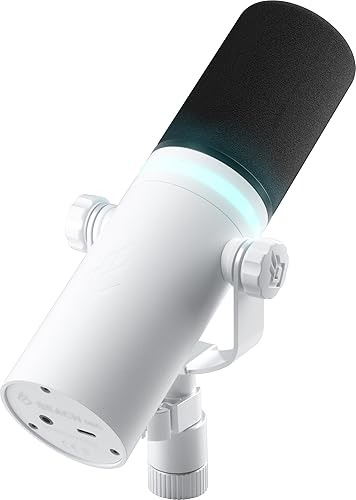
Rode NT-USB Mini
Rode
- ✓Cardioid condenser
- ✓Magnetic desktop stand
- ✓USB-C connection
- ✓Headphone monitoring
- ✓Works on iOS, Android, Mac, Windows
Pros
- Smallest footprint of any quality USB microphone in this guide
- Magnetic stand allows repositioning without clamping or tightening
- USB-C works natively on modern MacBooks and PCs without adapters
- Cross-platform — functions on iPad Pro and iPhone for mobile recording
Cons
- Cardioid only
- Smaller capsule means slightly higher noise floor than AT2020USB+ in identical conditions
- No headphone volume control on the unit itself
Best USB microphone for small desks, travel recording, or mobile use. The compact design, magnetic stand, and USB-C connection make it the most portable serious USB microphone available. Slightly below AT2020USB+ in pure recording quality but significantly smaller.
Your laptop's built-in microphone was never designed to sound good. It was designed to be cheap and fit inside a thin bezel.
That's why every video call, stream, or recording made with it picks up keyboard clicks, fan hum, and a flat, boxy voice.
A dedicated USB microphone fixes this instantly. No audio interface, no XLR cable, just plug in and the difference is obvious within one sentence.
We recorded identical test material on eight of them to find out which is worth your money. The Blue Yeti X came out on top, thanks to four switchable polar patterns and Blue VO!CE software that no competitor at its price matches.
Condenser vs Dynamic USB Microphones
Most USB microphones use condenser capsules. Condensers are sensitive and produce detailed, clear recordings, but they pick up more background noise and room reflections than dynamic microphones.
Dynamic microphones (like the Shure MV7) have tighter pickup patterns and reject more room noise, making them more suitable for untreated rooms. The trade-off is less high-frequency detail.
For a dedicated home studio with acoustic treatment: condenser USB microphone. For a bedroom, living room, or any space without acoustic treatment: dynamic USB microphone, or a condenser used with post-processing noise reduction.
Polar Patterns: What They Mean
Cardioid: picks up sound from the front, rejects sound from the sides and rear. Correct for solo recording.
Omnidirectional: picks up sound from all directions equally. Useful for recording a room ambience, group conversations around a table.
Bidirectional (figure-8): picks up sound from front and rear, rejects sides. Useful for two-person interviews with one microphone.
Stereo: captures spatial left-right information. Used for ASMR, musical performance, and environmental recording.
For solo streaming and podcasting: cardioid only. Multi-pattern microphones (Blue Yeti X, QuadCast S) provide flexibility but the additional patterns are rarely used by most solo content creators.
Gain and Proximity Effect
Gain: the amplification applied to the microphone signal. Setting gain correctly is critical — too low produces quiet audio that requires boosting (which amplifies noise); too high produces clipping (distorted, unusable audio).
Target gain level: voice peak levels hitting -12 to -6 dBFS. Most audio interfaces and USB microphones have gain controls. Blue's LED meter makes setting gain visual and immediate.
Proximity effect: condenser microphones produce enhanced bass response when the source is close to the capsule — typically within 20cm. Used intentionally, it produces a full, warm voice characteristic. Unintentional close-mic with high gain setting creates muddy, boomy sound. Speaking 10-20cm from the capsule is generally optimal.
Pop Filters and Shock Mounts
Pop filter: a mesh screen placed between mouth and capsule that diffuses plosive sounds (the burst of air from "P" and "B" consonants). The HyperX QuadCast S includes an internal pop filter. All other microphones in this guide benefit from an external pop filter ($10-20 accessory) or a foam windscreen.
Shock mount: an elastic suspension mount that isolates the capsule from vibrations transmitted through the desk and stand. The QuadCast S has a built-in shock mount. Other microphones benefit from a third-party shock mount ($20-40) for setups with typing or desk vibration.
Boom Arm vs Desktop Stand
All USB microphones include desktop stands. Desktop stands place the microphone in front of you on the desk, which works but puts the capsule at desk level rather than at mouth height.
A boom arm ($25-60) positions the microphone at mouth level, off to the side, and keeps the desk surface clear. The positioning improvement (closer to mouth, directly at mouth height) produces better recordings from any microphone.
The Rode NT-USB Mini's magnetic stand is the best included stand in this guide — it repositions quickly and holds angle without tightening. All other included stands require a boom arm for ideal positioning.
Software Processing
Blue VO!CE (included with Blue Yeti X): real-time voice processing with compressor, de-esser, noise gate, and EQ in software. Runs on the host PC, not the microphone hardware. Effective but requires the software to be running.
OBS built-in processing: ReaPlugs or VST3 plugins can run noise gate, compression, and EQ directly in OBS without additional software. For streamers, this integrates better than manufacturer software.
NVIDIA RTX Voice / Broadcast: AI-based noise suppression that reduces background noise dramatically. Most effective noise reduction available for PC users with NVIDIA RTX GPUs. Works with any microphone, not limited to specific brands.
Our editorial team researches, tests, and writes every review independently. We never accept payment for placement.