Elgato Stream Deck vs Loupedeck Live: Which Stream Controller Is Better?
Last updated: 2026-09-02 · By NicheHive Editorial
This article contains affiliate links. If you purchase through these links, we may earn a commission at no extra cost to you. As an Amazon Associate, NicheHive earns from qualifying purchases. See our full disclosure.
Elgato Stream Deck and Loupedeck Live are the two leading stream controllers. We compared them on OBS integration, button layout, screen customization, and value for streamers vs content creators.
Our Pick
elgato-stream-deck
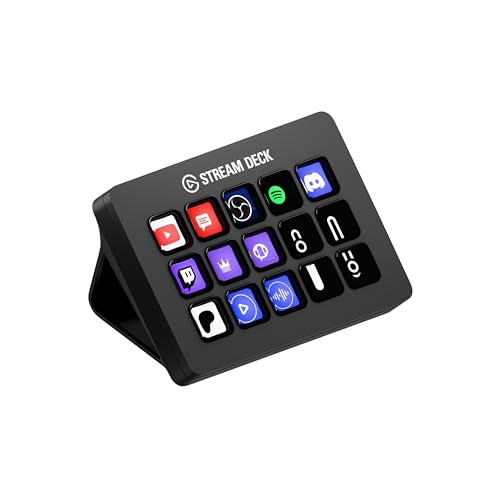
Elgato Stream Deck MK.2
Elgato
Pros
- 15 LCD keys with full customization
- Deep OBS, Twitch, and streaming platform integration
- Large plugin library
- Industry standard — most streaming guides reference it
Cons
- No analog controls (dials, sliders)
- Less useful for non-streaming content creation

Loupedeck Live
Loupedeck
Pros
- Includes dials and faders for analog control
- Better for video editing, audio mixing, and photo editing
- More inputs in a similar form factor
Cons
- Smaller plugin ecosystem than Stream Deck
- OBS integration is functional but less seamless than Stream Deck
- Higher price
Fifteen customizable buttons versus a mix of buttons, dials, and faders. On paper, it looks like Loupedeck Live just does more.
In practice, the right pick depends entirely on what you spend most of your time doing.
Stream Deck and Loupedeck address different use cases that sometimes overlap, and for streaming specifically, one of them is built for the job in a way the other isn't.
For Streamers: Stream Deck Wins
Elgato built the Stream Deck specifically for streaming workflow. The OBS integration, Twitch chat triggers, scene switching, and alert system integrations are the most thoroughly developed in the market. The plugin library covers every major streaming tool.
If streaming is the primary use case, Stream Deck is the right choice.
For Content Creators: Loupedeck Is More Versatile
Loupedeck Live includes analog dials and faders — Stream Deck does not. These are genuinely useful for:
- Audio mixing: dial for per-source volume adjustment
- Video editing: scrub timeline, adjust clip speed
- Photo editing: exposure, saturation dials
For a creator who both streams and edits video/photos, Loupedeck Live covers more workflow than Stream Deck.
Integration Quality
Stream Deck's plugin ecosystem is larger and more mature — more tools have official Stream Deck plugins than Loupedeck plugins. Loupedeck's OBS integration works but is less seamless than Stream Deck's.
Price Comparison
Stream Deck MK.2 (15 keys) and Loupedeck Live are in the same price range. The value proposition depends on whether analog controls are worth the tradeoff in OBS integration quality.
The Verdict
Buy Stream Deck if: streaming is your primary use case, you want maximum OBS integration depth.
Buy Loupedeck if: you need analog controls for video/photo work alongside streaming.
Related Guides
- Elgato Stream Deck Review - Stream Deck detailed review
- Streaming Setup Buying Guide - full setup guide
- Best Streaming Accessories - all hardware picks
Frequently Asked Questions
Our editorial team researches, tests, and writes every review independently. We never accept payment for placement.