Best Ergonomic Keyboards for Programmers: 10 Picks for All-Day Coding
Last updated: 2026-09-03 · By NicheHive Editorial
This article contains affiliate links. If you purchase through these links, we may earn a commission at no extra cost to you. As an Amazon Associate, NicheHive earns from qualifying purchases. See our full disclosure.
10 best ergonomic keyboards for programmers covering split layouts, mechanical switches, programmable layers, tenting, thumb clusters, and the boards that reduce strain during 8+ hours of daily coding.
Our Top Picks
- #1Kinesis Freestyle2 Blue for PC (9 Inch Separation)
- #2Logitech Ergo K860 Wireless Ergonomic Split Keyboard
- #3Perixx Periboard-512B Ergonomic Split Keyboard
- #4Microsoft Ergonomic Keyboard (LXM-00004)
- #5Kinesis Advantage2 Quiet LF Mechanical Ergonomic Keyboard
- #6Microsoft Sculpt Ergonomic Keyboard for Business
- #7Goldtouch V2 Adjustable Comfort Keyboard
- #8Logitech Wave Keys Wireless Ergonomic Keyboard
- #9Kensington Pro Fit Ergonomic Wireless Keyboard
- #10Adesso Tru-Form Media Contoured Ergonomic Keyboard

Kinesis Freestyle2 Blue for PC (9 Inch Separation)
Kinesis
- ✓Fully split halves connected by pivot tether, 0 to 9 inches of separation
- ✓Standard QWERTY stagger, no columnar relearning
- ✓Optional VIP3 kit adds 5/10/15-degree tenting and palm rests
- ✓Low-force membrane switches
- ✓Bluetooth (Blue model) plus wired USB, Mac/PC DIP switch toggle
Pros
- Shoulder-width positioning is the only design on this list that addresses upper back and shoulder strain, not just wrist angle
- Standard QWERTY layout means the adjustment period is about hand positioning, not relearning key locations
- Tether-connected halves survive daily repositioning without connector wear
- Works identically on Mac and PC via a physical DIP switch, no drivers needed
Cons
- No integrated palm rest or tenting out of the box; VIP3 accessories are a separate purchase that pushes total cost to 120-150 dollars
- 1 to 2 week adaptation period, longer than fixed-split boards like the K860
- Membrane switches feel mushy next to the mechanical Kinesis Advantage2
- 9-inch max separation is tethered, not fully wireless between halves

Logitech Ergo K860 Wireless Ergonomic Split Keyboard
Logitech
- ✓9-degree fixed splay with curved split key groups
- ✓Integrated memory foam palm rest
- ✓Adjustable tenting legs for negative tilt
- ✓Bluetooth multi-device switching across 3 computers plus Logitech Unifying receiver
- ✓2-year battery life on 2 AAA batteries
Pros
- Addresses wrist angle, contact pressure, and pronation in a single unit with no accessory purchases
- 3 to 5 day adaptation period is the shortest of any split keyboard on this list
- One-button Bluetooth switching between 3 paired computers suits multi-machine developer setups
- 2 years per battery set eliminates the recharge-anxiety of most wireless keyboards
Cons
- Fixed chassis caps splay at 9 degrees and cannot address shoulder-width positioning
- Full-size layout with integrated number pad pushes the mouse further right
- Membrane switches lack the tactile break programmers get from mechanical boards
- At 100-130 dollars it costs more than most budget splits without offering mechanical switches

Perixx Periboard-512B Ergonomic Split Keyboard
Perixx
- ✓Wired USB split layout
- ✓Integrated palm rest
- ✓Fixed splay angle, no independent half positioning
- ✓Standard QWERTY key stagger
Pros
- Under 40 dollars is the cheapest genuine split-layout entry point on this list
- Wired connection means zero input latency and no battery to manage
- Integrated palm rest delivers real ergonomic benefit despite the low price
- Good low-risk way to test whether a split layout helps before spending more
Cons
- Key feel is noticeably mushy compared to the K860 or Freestyle2
- Build quality is basic plastic that flexes more than premium options
- Fixed splay means no tenting or adjustment once purchased
- No wireless option, tying the keyboard to a single desk position

Microsoft Ergonomic Keyboard (LXM-00004)
Microsoft
- ✓Wired USB split layout with cushioned palm rest
- ✓Conventional key stagger for a shorter adjustment period
- ✓Crisp membrane switch feel
- ✓No software or drivers required
Pros
- Crisp key feel for a membrane keyboard, better than most budget splits
- Conventional layout keeps the learning curve short, typically under a week
- Cushioned palm rest is integrated rather than a separate add-on
- Simple wired USB setup that IT departments can standardize without software installs
Cons
- No tenting or adjustable splay, the angle is fixed at the factory
- Wired only, no Bluetooth or wireless option
- Splay is modest, so it does less for shoulder strain than a fully split board
- No programmable keys or macro support

Kinesis Advantage2 Quiet LF Mechanical Ergonomic Keyboard
Kinesis
- ✓Contoured concave key wells with columnar key layout
- ✓Integrated thumb cluster for modifier keys
- ✓Quiet Cherry MX Silent Red mechanical switches
- ✓Fully programmable via Kinesis SmartSet engine, onboard remapping and macros
- ✓Integrated palm supports
Pros
- Concave key wells and thumb cluster eliminate the finger stretching that causes strain on flat keyboards
- Cherry MX Silent Red switches give tactile, low-force mechanical feedback without loud clacking
- SmartSet programmable engine supports full remapping for Vim motions and IDE shortcuts without extra software
- Widely regarded by programmers as delivering the largest ergonomic improvement of any keyboard in this list
Cons
- Columnar, concave layout requires 1 to 2 weeks of real relearning, not just repositioning
- At 300-350 dollars it is the most expensive keyboard on this list by a wide margin
- Large footprint and unconventional shape make it impractical to travel with
- No backlighting and a dated USB-only connection, no Bluetooth

Microsoft Sculpt Ergonomic Keyboard for Business
Microsoft
- ✓Dome-shaped split key bed with detached number pad
- ✓Cushioned detachable palm rest
- ✓Proprietary wireless dongle paired at the factory
- ✓Compact footprint that keeps the mouse close to centerline
Pros
- At 45-60 dollars it is the cheapest genuine ergonomic improvement on this list
- Detached number pad keeps the mouse close to the keyboard, reducing reach-related shoulder strain
- Dome shape reduces ulnar deviation about as effectively as pricier split boards
- Over a decade of market presence with a large installed base and known reliability
Cons
- Wireless dongle is proprietary and factory-paired; losing it means replacing the whole keyboard
- No tenting adjustment, the dome angle is fixed
- Detached number pad adds desk clutter compared to single-unit keyboards
- Membrane switches with limited key travel feel low-effort under sustained typing

Goldtouch V2 Adjustable Comfort Keyboard
Goldtouch
- ✓Independently rotating halves, up to 30 degrees splay each
- ✓Independent tenting up to 15 degrees per half
- ✓Wired USB connection
- ✓Compact modular design
Pros
- Independent per-half rotation and tenting is a rare feature at this price point
- Lets programmers dial in the exact splay and pronation angle that feels neutral, rather than accepting a factory-fixed angle
- Solid build for a budget adjustable split keyboard
- Compact modular halves take up less desk space than a fully split tethered board
Cons
- Wired only, no wireless option
- Adjustment mechanism adds a learning curve to find the right angle, more fiddly than fixed-splay boards
- No integrated palm rest included
- Membrane switches with a plasticky feel compared to mechanical options

Logitech Wave Keys Wireless Ergonomic Keyboard
Logitech
- ✓Gentle wave-shaped key bed, not a full split
- ✓Integrated palm rest
- ✓Bluetooth and Logitech Unifying receiver connectivity
- ✓Quiet membrane switches
Pros
- Wave shape guides fingers into a natural arc with almost no adjustment period
- Good transition board for typists moving from a flat keyboard toward a full split like the K860 or Freestyle2
- Integrated palm rest and quiet keys make it comfortable for open-office use
- Reliable Logitech wireless connectivity with long battery life
Cons
- Gentle curve delivers less ulnar deviation relief than a true split like the K860
- No tenting adjustment
- Not a meaningful upgrade path for programmers with existing wrist pain who need a real split
- Full-size layout takes up more desk space than compact alternatives
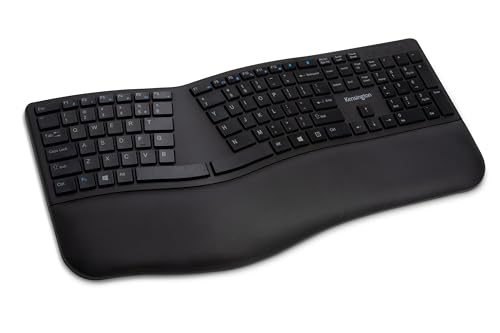
Kensington Pro Fit Ergonomic Wireless Keyboard
Kensington
- ✓Wireless split keyboard with moderate splay angle
- ✓Quiet key switches
- ✓Compact low-profile design
- ✓2.4GHz wireless receiver
Pros
- Moderate splay is easier to adjust to than aggressive split designs
- Quiet keys suit open-office and shared-space environments
- Low-profile build fits under standard monitor arms and keyboard trays
- Reliable 2.4GHz wireless with minimal input lag
Cons
- Moderate splay means less ulnar deviation relief than a fully split board
- No tenting legs included
- Palm rest is thinner and less supportive than the K860's
- Battery life is shorter than AAA-powered competitors, requiring more frequent recharging

Adesso Tru-Form Media Contoured Ergonomic Keyboard
Adesso
- ✓Split keyboard with built-in touchpad
- ✓Wired USB connection
- ✓Contoured key wells
- ✓Eliminates separate mouse for reduced reach
Pros
- Integrated touchpad removes the constant keyboard-to-mouse reach that contributes to shoulder strain
- Split layout with contoured wells gives real ergonomic benefit at a mid-range price
- Single-cable wired setup with no dongle or pairing required
- Useful for tight desks where a separate mouse isn't practical
Cons
- Built-in touchpad is less precise than a dedicated mouse for detailed editing or design work
- Bulkier chassis than a standard split keyboard due to the touchpad module
- Membrane switches feel basic and offer little tactile feedback
- Wired only, no wireless option
Your hands don't know the difference between a bug you're chasing at 2pm and one you're chasing at 9am, but by hour six they're paying for both. Ctrl+Shift+Alt chords, Vim motions, bracket reaches, thousands of them, add up in a way flat keyboards were never built to absorb.
An ergonomic keyboard for programmers has to solve wrist angle, pronation, and modifier-key strain all at once.
So which board actually earns a spot next to a compiler running 8 hours a day?
The Logitech Ergo K860 tops this list because it handles ulnar deviation, pronation, and wrist extension in one unit, with a 3 to 5 day adjustment period that's shorter than any split board here. If shoulder strain is the bigger issue, the fully split Kinesis Freestyle2 lets you position each half at shoulder width instead.
The 10 Best Ergonomic Keyboards for Programmers
1. Kinesis Freestyle2 Blue
The Kinesis Freestyle2 is the most accessible fully split keyboard for programmers who want shoulder-width positioning without the steep learning curve of a columnar layout. The two halves connect via a pivot tether that allows up to 9 inches of separation, and optional VIP3 tenting accessories add adjustable tenting angles.
The key layout is standard QWERTY, so there is no relearning period. Low-force membrane switches reduce fatigue over long sessions. Bluetooth connectivity works with Mac, PC, and Linux. The Freestyle2 is the keyboard to buy if wrist strain has escalated to shoulder and upper back pain, because the fully split positioning is the only design that addresses shoulder abduction.
2. Logitech Ergo K860
The K860 addresses wrist angle and pronation without requiring two separate halves, which makes it the practical choice for programmers who want ergonomic benefits with minimal desk disruption. The curved split, integrated palm rest, and adjustable tenting cover the three most impactful ergonomic features in a single unit.
Multi-device switching between three computers via Bluetooth is particularly useful for developers who work across a personal machine and work machine.
3. Perixx Periboard-512
Budget wired option for programmers who want to test whether a split layout helps before investing more. The split angle and integrated palm rest deliver genuine ergonomic benefit. Wired connection means zero latency and no battery management.
4. Microsoft Ergonomic Keyboard
Wired USB with a split layout and cushioned palm rest. The key feel is crisp for a membrane keyboard, and the conventional layout reduces adjustment time. A safe choice for office environments where IT departments standardize peripherals.
5. Kinesis Advantage2 Quiet LF
The most respected mechanical ergonomic keyboard on the market. Contoured key wells, integrated palm supports, and a thumb cluster for the most-used modifier keys eliminate the finger stretching that causes strain during long coding sessions. Quiet Cherry MX Silent Red switches give tactile, low-force keystrokes without the noise of standard mechanical switches.
The learning curve is real — the concave key wells and thumb cluster take a week or two to adjust to — but programmers who commit to it report the biggest ergonomic improvement of any keyboard on this list. Fully programmable through Kinesis's SmartSet engine, which matters for anyone who wants to remap keys for Vim or IDE shortcuts.
6. Microsoft Sculpt
The Sculpt's dome shape and detached number pad create a compact ergonomic footprint that keeps the mouse close to the keyboard. At 45 to 60 dollars it is the cheapest genuine ergonomic improvement available.
7. Goldtouch V2 Adjustable Comfort Keyboard
A genuinely adjustable split keyboard: each half rotates independently up to 30 degrees and tents up to 15 degrees, letting programmers dial in the exact split angle and pronation that feels neutral for their shoulders. The adjustment mechanism is a rare feature at this price point.
8. Logitech Wave Keys
Gentle curve for programmers who want modest ergonomic benefit without committing to a full split. Good transition board before moving to a K860 or Freestyle2.
9. Kensington Pro Fit Ergonomic
Wireless split keyboard with a moderate splay angle. Quiet keys suit open-office environments.
10. Adesso Tru-Form Media
Split keyboard with integrated touchpad eliminates the mouse reach entirely, which addresses the shoulder strain that comes from constantly moving between keyboard and mouse.
Three Remaps Every Programmer Should Make
Regardless of which ergonomic keyboard you choose, three key remaps reduce finger strain immediately.
Caps Lock to Ctrl. The most impactful single remap for programmers. Ctrl is the most-used modifier in nearly every IDE and terminal, and moving it from the bottom corner to the home row eliminates a constant pinky stretch.
Right Alt to a layer key. If your keyboard supports layers, mapping Right Alt to a layer toggle puts arrow keys, Home, End, and brackets on the home row, eliminating hand movement to the far right of the keyboard.
Escape to a thumb key. For Vim users, Escape is used thousands of times per session. Moving it from the far upper left to a thumb position eliminates one of the longest reaches in Vim workflows.
For the full recommendation list, see best ergonomic keyboards.
Frequently Asked Questions
Our editorial team researches, tests, and writes every review independently. We never accept payment for placement.