Best Ergonomic Keyboards 2026: Split, Tented, and Low-Profile Designs Tested
Last updated: 2026-08-19 · By NicheHive Editorial
This article contains affiliate links. If you purchase through these links, we may earn a commission at no extra cost to you. As an Amazon Associate, NicheHive earns from qualifying purchases. See our full disclosure.
Ergonomic keyboards reduce wrist pronation and ulnar deviation — the two main contributors to typing-related RSI. We tested split, tented, and low-profile designs across comfort, adaptation period, and typing accuracy.
Our Top Picks

Logitech Ergo K860 Split Keyboard
Logitech
- ✓Split design with fixed 20-degree tent angle
- ✓Wireless Bluetooth and USB receiver
- ✓Wrist rest integrated into keyboard
- ✓Low-profile keys
- ✓Compatible with Logitech Flow multi-device switching
- ✓Works with Mac and Windows layout profiles
Pros
- Best entry-level ergonomic keyboard for users switching from standard keyboards
- Integrated wrist rest at the correct height for the split key area
- 20-degree tent angle reduces wrist pronation without requiring significant adaptation
- Multi-device Bluetooth switching useful for desktop + laptop workflows
Cons
- Fixed tent angle cannot be adjusted
- Non-mechanical switches — not appropriate for users who prefer mechanical switch feedback
- Takes 1-2 weeks to return to full typing speed
Best ergonomic keyboard for office users making their first switch from a standard keyboard. The integrated wrist rest, moderate tent angle, and familiar layout reduce the adaptation burden compared to fully-split or columnar keyboards.
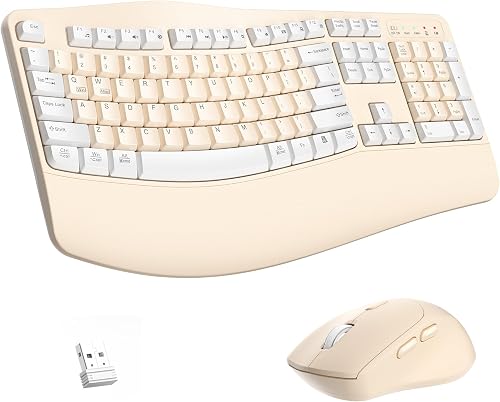
Kinesis Freestyle2 Blue for Mac/PC
Kinesis
- ✓Fully split: two independent halves connected by cable
- ✓Adjustable separation distance
- ✓Bluetooth wireless
- ✓Compatible with VIP3 accessory for 15-degree tent
- ✓Mechanical switch option available
Pros
- Fully split halves can be positioned at shoulder-width — maximum shoulder ergonomics
- No fixed tent means you can add a separate tenting accessory to exact angle preference
- Longer track record than most split keyboard brands
Cons
- No integrated wrist rest — requires separate purchase
- Tent accessory (VIP3) sold separately — adds cost
- Cable between halves requires routing consideration on desk
Best fully-split ergonomic keyboard for users who want maximum shoulder-width adjustment. The Kinesis Freestyle2's full separation allows truly custom positioning. Tenting requires the optional VIP3 accessory.

Microsoft Sculpt Ergonomic Keyboard
Microsoft
- ✓Curved split design — one-piece but curved
- ✓Fixed 3-degree negative tilt
- ✓Cushioned palm rest
- ✓Separate number pad
- ✓2.4GHz wireless
Pros
- Most affordable ergonomic keyboard at $60
- Curved layout is familiar for touch typists transitioning from standard keyboards
- Separate number pad allows mouse placement closer to the keyboard
Cons
- One-piece design limits shoulder adjustment — halves cannot be fully separated
- No Bluetooth — only 2.4GHz dongle
- Build quality does not match Logitech K860 at similar price points
Best budget ergonomic keyboard. At $60, the Microsoft Sculpt provides the ergonomic curve and split design at the lowest price in the mainstream ergonomic keyboard category. Appropriate for users who want to try ergonomic typing before committing to a $130+ keyboard.
Most people don't think about their keyboard until their wrist does the thinking for them, usually as a dull ache by mid-afternoon.
That ache traces back to three things: your forearms rotating flat to reach the keys, your wrists bending outward to center your hands, and your hands reaching up over a keyboard that's too thick. A standard keyboard does all three at once.
An ergonomic keyboard is built to undo them.
After testing split, tented, and low-profile designs, the Logitech Ergo K860 comes out on top. It's the only board here that addresses pronation, ulnar deviation, and wrist extension in a single unit, without a multi-week adjustment period.
The Adaptation Period: What to Expect
Switching from a standard QWERTY keyboard to an ergonomic split keyboard involves relearning muscle memory for key positions. The most common challenges:
Keys near the center: the B, Y, T, G, and H keys are often reached by the wrong hand on a standard keyboard due to their central position. On a split keyboard, these keys are explicitly assigned to one hand — correcting sloppy typing habits but requiring deliberate relearning.
Typing speed reduction: expect a 40-60% reduction in typing speed for the first week and 20-30% for the second week. Most typists return to their original speed by week 3-4. Some typists never fully return to standard keyboard speed — particularly those who relied on non-touch-typing technique.
Productivity impact: for office workers who type as a primary job function, the 1-2 week adaptation period represents real productivity loss. Plan the transition for a period with lighter writing demands.
Tent Angle: Why It Matters
Tent angle describes how much the center of the keyboard is raised relative to the edges. A flat keyboard has 0-degree tent. A 20-degree tented keyboard has the center of each half raised 20 degrees above the outer edge.
Increasing tent angle reduces wrist pronation — the rotation of the forearm that places the palm facing down. Full tent (90 degrees) would have the hands facing each other vertically — the anatomically neutral position for the wrist.
Most ergonomic keyboards offer 0-20 degrees of tent. Higher tent angles (up to 90 degrees) are available in premium enthusiast keyboards (ZSA Moonlander, Dactyl Manuform). Higher tent angles require longer adaptation periods.
For first-time ergonomic keyboard users: 15-20 degrees is a good starting point. It provides meaningful ergonomic improvement without the dramatic appearance and adaptation requirement of extreme tenting.
Split vs Curved Split vs Standard
Fully split (Kinesis Freestyle2): two independent halves connected by a cable. Full shoulder-width placement. Maximum ergonomic benefit. Maximum adaptation required.
Curved one-piece (Microsoft Sculpt): both halves in one unit with a curved layout. Less adaptation required. Less ergonomic benefit than fully split — shoulder positioning is still constrained by the one-piece design.
Fixed split with bridge (Logitech K860): two sections separated by a fixed gap, permanently joined. More ergonomic than curved one-piece, less than fully split. Best adaptation-to-benefit ratio.
Standard ergonomic (low-profile mechanical keyboards like Logitech MX Keys): no split, but lower profile and negative tilt options reduce wrist extension. Minimal adaptation, minimal ergonomic benefit over standard keyboards.
For users with RSI symptoms: fully split with tent. For users seeking prevention: Logitech K860 or similar fixed-split. For users who want minimal adaptation: low-profile standard.
Who Should Not Buy an Ergonomic Keyboard
Ergonomic keyboards are not appropriate for:
Occasional typists: if you type less than 2 hours per day, the ergonomic benefit is minor. The adaptation cost is the same regardless of usage intensity.
Vim users and keyboard shortcut users: some ergonomic keyboards move keys that are crucial for keyboard shortcuts. Verify that your most-used shortcuts work on the specific keyboard's layout before purchasing.
Gamers: split and tented keyboards are designed for touch typing, not WASD gaming. Standard gaming keyboards are better suited for gaming use.
Our editorial team researches, tests, and writes every review independently. We never accept payment for placement.