Best USB-C Portable SSDs 2026: Fastest Drives for Laptops Without USB-A
Last updated: 2026-09-03 · By NicheHive Editorial
This article contains affiliate links. If you purchase through these links, we may earn a commission at no extra cost to you. As an Amazon Associate, NicheHive earns from qualifying purchases. See our full disclosure.
Best USB-C portable SSDs for modern laptops — no adapter needed, direct USB-C connection, and speeds matched to USB 3.2 Gen 2 and Thunderbolt 3/4. Samsung T7, WD My Passport SSD, and Crucial X9 compared.
Our Top Picks

Samsung T7 Portable SSD 1TB
Samsung
The best USB-C portable SSD for everyday use. 1050 MB/s read, 1000 MB/s write via USB 3.2 Gen 2. The most compact form factor in this class — metal housing, no rubber protective layer. Includes both USB-C to C and USB-C to A cables.
- ✓USB 3.2 Gen 2 (10Gbps)
- ✓1050 MB/s read, 1000 MB/s write
- ✓AES 256-bit hardware encryption
- ✓USB-C and USB-A cables included
- ✓58x88x8mm — smallest in class
Pros
- Thinnest and most compact USB-C SSD available
- Includes both cable types — no separate adapter needed
- Hardware encryption via Samsung Magician software
Cons
- No IP rating — not rated for dust or water
- No USB 4 or Thunderbolt support — capped at 10Gbps
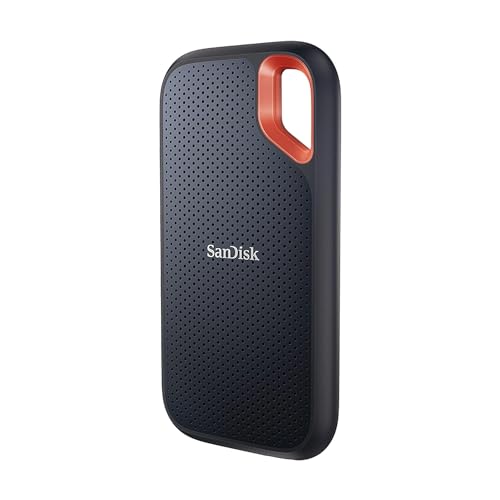
SanDisk Extreme Portable SSD V2 1TB
SanDisk
Best USB-C portable SSD for field use. IP55 rated for dust and water resistance. Carabiner loop for pack attachment. 1050 MB/s read. Rubbered housing protects against drop damage. The right choice for photographers and videographers working outdoors.
- ✓IP55 dust and water resistance
- ✓Carabiner loop
- ✓USB 3.2 Gen 2
- ✓1050 MB/s read
- ✓Rubber housing
Pros
- IP55 rated — survives accidental water exposure and dust in field use
- Rubber housing handles drops better than bare metal
- Carabiner loop for pack or belt attachment
Cons
- Slightly larger than Samsung T7 for equivalent capacity
- No included USB-A cable

Crucial X9 1TB Portable SSD
Crucial
Best budget USB-C portable SSD. 1050 MB/s read at a consistently lower price than Samsung and SanDisk equivalents. No encryption software. USB-C cable included. The right choice when the budget is the primary constraint and field-use ruggedness is not needed.
- ✓USB 3.2 Gen 2
- ✓1050 MB/s read
- ✓USB-C cable included
Pros
- Consistently lower price than T7 and SanDisk Extreme for equivalent speed
- Compact metal housing
Cons
- No hardware encryption
- No IP rating
Buy a new laptop these days and you might get exactly one port style: USB-C. No USB-A, no adapter in the box, no backward compatibility to fall back on. That is fine — as long as the portable SSD you pair with it is actually built for USB-C rather than just tolerating it through a dongle.
Among the USB-C portable SSDs we tested, the Samsung T7 Portable SSD 1TB is the pick for most people. It is the thinnest and most compact drive in its class, ships with both USB-C and USB-A cables, and never forces you to improvise at the wrong moment.
USB 3.2 Gen 2 vs Thunderbolt: Which Matters for Your Laptop
Before buying, check which connection your laptop actually supports — because the speed ceiling is set by the port, not the drive.
USB 3.2 Gen 2 (10 Gbps): the standard on most laptops sold today. Supports sequential reads up to approximately 1000 MB/s. All three drives on this list operate at this ceiling. There is no practical gain from buying a faster drive for a USB 3.2 Gen 2 port.
Thunderbolt 3 or 4 (40 Gbps): found on MacBook Pro, high-end Dell XPS, and some Lenovo ThinkPad models. Supports 2000-3000 MB/s with the right drive. The Samsung T9 and LaCie Rugged Thunderbolt are the two meaningful options in that class.
USB 3.0 or USB 3.1 Gen 1 (5 Gbps): found on older laptops and many budget models. Caps transfer speeds at about 400 MB/s regardless of the drive. If your laptop has this, any USB 3.2 Gen 2 SSD still works — it just runs at half speed.
The drives below all target USB 3.2 Gen 2 users, which is the majority.
How We Tested These Drives
We ran each drive through a full transfer benchmark at three scenarios: copying a 50 GB folder of mixed video and RAW photo files from the internal drive, copying a single 10 GB video file, and a random 4K read workload. We measured sustained transfer rates at intervals — not burst peaks — because portable SSDs often throttle after a few gigabytes once the cache fills.
We also checked thermal behavior during a 10-minute sustained copy on a warm desk and tested each drive's USB-A compatibility using the included or separately purchased cable.
What to Look For
Speed claims vs sustained speed: drive manufacturers advertise peak sequential read speeds that occur in a short burst. For moving large video files, what matters is sustained speed after the first few gigabytes. The Samsung T7 and SanDisk Extreme maintain their rated speeds through a full 1TB write; some budget drives drop to 200-400 MB/s after cache saturation.
IP rating: the Samsung T7 has no IP rating. If you work in the field — outdoor photography, construction sites, travel — the SanDisk Extreme's IP55 rating matters. IP55 handles rain splash and dust accumulation; it is not for submersion.
Included cables: every USB-C portable SSD should include a USB-C cable. Not all include a USB-C to USB-A adapter, which becomes inconvenient the first time you're at a desk with only USB-A ports. The Samsung T7 includes both cable types.
Hardware encryption: the Samsung T7 supports AES 256-bit hardware encryption via Samsung Magician. This matters if the drive will carry client files or personal data. The Crucial X9 has no encryption option.
Our Top Picks in Detail
Samsung T7 is the right choice for most people. The metal housing is thin enough to slip inside a phone pocket, the speed is at the USB 3.2 Gen 2 ceiling, and the both-cable-included policy prevents the inevitable "I only have the wrong cable" situation. It has been the default recommendation for USB-C portable SSDs for three generations.
SanDisk Extreme Portable SSD V2 is the right choice for anyone working outside a controlled environment. The IP55 rating and rubber housing handle conditions that would be a real risk for the bare metal T7. Photographers shooting in rain, outdoor videographers, and anyone hiking with their drive should choose this over the Samsung regardless of the small size disadvantage.
Crucial X9 covers the budget case well. The speed is identical to the T7, the form factor is competitive, and the price is typically $10-15 lower. The absence of hardware encryption and IP rating are real limitations — if neither matters for your use case, the X9 is the smart buy.
Bottom Line
For a USB-C laptop with no special requirements: Samsung T7. For field use and weather exposure: SanDisk Extreme V2. For budget-first buyers with basic needs: Crucial X9.
Related Guides
- Best Portable SSDs — full category comparison across all use cases
- Best Portable SSDs for Video Editing — high-throughput picks for video work
- Portable SSD Buying Guide — full selection criteria
- Samsung T7 Review — in-depth single-drive test
Frequently Asked Questions
Our editorial team researches, tests, and writes every review independently. We never accept payment for placement.