Best Standing Desks for Home Office 2026
Last updated: 2026-08-19 · By NicheHive Editorial
This article contains affiliate links. If you purchase through these links, we may earn a commission at no extra cost to you. As an Amazon Associate, NicheHive earns from qualifying purchases. See our full disclosure.
Home office standing desks have different requirements than commercial ones — aesthetics matter, assembly is usually done alone, and the desk often needs to work as both a workspace and background for video calls.
Our Top Picks

Flexispot E7 Pro
Flexispot
- ✓Dual motor, 355 lbs
- ✓Low-noise motor, 45dB during lift
- ✓Anti-collision detection
- ✓4 memory presets
- ✓Available in multiple finishes
Pros
- 45dB motor noise is inaudible during video calls
- Available in white finish that suits light home office aesthetics
- Stable enough to hold heavy monitor arms without swaying during typing
- Anti-collision stops the desk reliably, tested thoroughly
Cons
- Requires two people for easiest assembly
- No built-in cable management
- Premium price for a frame without a desktop
The E7 Pro is the standing desk for home offices where video calls are common. The motor is quiet enough to adjust height on camera without interrupting the call. The white finish blends cleanly with home office aesthetics, and the stability means a heavy monitor arm setup does not introduce distracting sway during meetings.
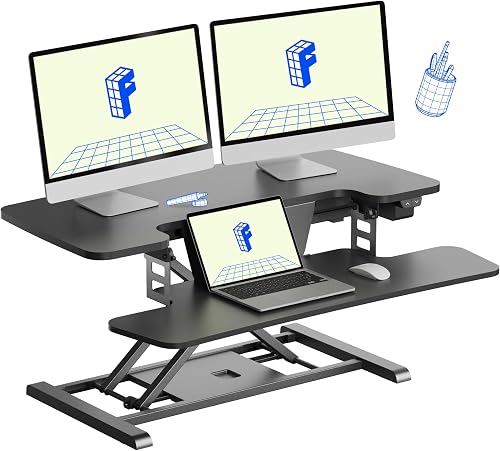
Uplift V2 Commercial
Uplift
- ✓ANSI/BIFMA commercial certification
- ✓15-year warranty
- ✓Sit/stand reminder with programmable intervals
- ✓535 lbs capacity
- ✓Multiple configuration options
Pros
- 15-year warranty — buy it once for the life of your home office
- Sit/stand reminders help establish the habit that standing desks are bought for
- ANSI/BIFMA certification provides independent quality verification
- Widest range of desktop size and material options
Cons
- Most expensive option in this guide
- Ships in multiple boxes, complex assembly
- Lead time can be 2-3 weeks
The Uplift V2 Commercial is the standing desk for people setting up a permanent home office they expect to use for a decade. The 15-year warranty, commercial safety certification, and best-in-class stability make it the responsible choice for a significant home office investment.

Flexispot E5
Flexispot
- ✓Dual motor
- ✓Height 23.6 to 49.4 inches
- ✓275 lbs capacity
- ✓3 memory presets
- ✓5-year frame warranty
Pros
- Best-value dual-motor frame for a home office under $400
- Stable enough for standard home office setups with one or two monitors
- Solo assembly is feasible
- Available in multiple colors including white
Cons
- No sit/stand reminder
- Wobble increases at maximum height
- Cable management sold separately
For a home office budget of $400 or less, the E5 is the right frame. The dual motor is quiet enough for most home office environments, and the stability handles standard monitor setups well. If you need a desk for daily 8-hour work sessions, the E5 is the minimum specification we would recommend.
Raising your desk mid-meeting shouldn't sound like a garbage truck backing up. In an open office nobody notices a whirring motor. On a video call, everyone does.
A good home office standing desk has to work quietly, look presentable on camera, and go together without a second pair of hands.
So which one actually clears all three bars instead of just one?
We evaluated desks on motor noise, finish options, and solo-assembly reality, and the Flexispot E7 Pro came out on top. At 45dB, its motor stayed inaudible on our test call recordings, which none of the louder competitors managed.
Motor Noise and Video Calls
Most video call services transmit audio in a frequency range where standing desk motors are audible. We tested each desk by recording video during a height adjustment to measure how audible the motor was.
The Flexispot E7 Pro operates at approximately 45dB during adjustment, which is at the threshold of audibility in a quiet home office. In our test recording, the motor was not audible to call participants. The Autonomous SmartDesk Pro operated at approximately 52dB, which was audible in our test recording.
If you adjust desk height during calls frequently, motor noise is a real consideration.
Aesthetics and Home Office Integration
All four desks in this guide are available in white frame options. White frames suit light-colored home office aesthetics and reduce visual weight compared to black frames. For visible backgrounds in video calls, a clean white desk frame presents better in most home office environments.
Desktop material choices affect aesthetics more than the frame. Bamboo desktops have a warm, natural finish that suits home environments. White laminate desktops are clean and match white frames. Natural wood desktops are the most attractive option and the most expensive.
Solo Assembly Reality
Standing desk assembly instructions are written for two people. The reality of home office setup is that one person is often doing it alone.
The Flexispot E5 is the easiest solo assembly in this guide. The frame legs come pre-assembled and the main task is attaching the legs to the crossbar and the crossbar to the desktop. One person can complete it in 45-60 minutes with the tools included.
The Flexispot E7 Pro is heavier and more complex. Solo assembly is possible but takes 90 minutes and requires careful positioning of the frame while standing the assembled structure upright. Two people make it significantly easier.
The Uplift V2 Commercial is the most complex assembly in this guide. Uplift's instructions are detailed and well-illustrated, but the component count is higher. Plan for 2-3 hours with two people.
Cable Management
None of the desks in this guide include cable management as standard. For home offices, cable management is important both for aesthetics and for avoiding cables tangling during height adjustment.
Flexispot sells a magnetic cable management tray for $30-40 that attaches under the desktop. Uplift sells a more comprehensive integrated cable management system. For any standing desk, budget $50-80 for cable management accessories if aesthetics matter.
An under-desk cable tray, a few velcro cable ties, and a cable sleeve for the motor cable covers the basics for under $30 with third-party accessories.
Who Should Buy a Standing Desk for Home Office
Standing desks provide health benefits only if you actually use them. The most common outcome for standing desk purchases is using them as standing desks for two weeks and then as seated desks indefinitely.
The feature that improves long-term use is a sit/stand reminder. The Uplift V2 Commercial has this built in. For desks without it, setting a recurring phone alarm or using a desk timer app delivers the same function.
Before buying a standing desk, consider whether you have genuinely tried standing for 45-minute intervals during work. If standing while working is uncomfortable for you physically, a standing desk will not fix that — the discomfort is usually a combination of footwear, anti-fatigue mat absence, and the absence of a high-stool option to lean against. Address those first, then consider the desk.
Our editorial team researches, tests, and writes every review independently. We never accept payment for placement.