Best NAS Devices 2026: Synology vs QNAP vs Western Digital for Home and Office
Last updated: 2026-08-19 · By NicheHive Editorial
This article contains affiliate links. If you purchase through these links, we may earn a commission at no extra cost to you. As an Amazon Associate, NicheHive earns from qualifying purchases. See our full disclosure.
We tested NAS devices for transfer speeds, app ecosystem quality, drive compatibility, and long-term reliability. Synology, QNAP, and Western Digital NAS units compared for home media servers, backups, and small business use.
Our Top Picks

Synology DS223j 2-Bay NAS
Synology
- ✓2-bay (diskless)
- ✓Realtek RTD1619B processor
- ✓1GB DDR4 RAM
- ✓Gigabit Ethernet
- ✓DiskStation Manager (DSM) OS
Pros
- Synology DSM is the best NAS operating system — clean UI, regular updates, deep app ecosystem
- Photos app replaces Google Photos for unlimited photo storage on your own hardware
- Drive compatibility list is the most comprehensive in the industry
- SMB and NFS sharing work with Windows, Mac, and Linux without configuration
- Active Backup for Business and Hyper Backup available for free
Cons
- 1GB RAM limits transcoding capability — 4K transcoding requires a more powerful unit
- 2-bay limits expansion — RAID 1 uses both bays for redundancy, leaving no room for growth
- Diskless — drives sold separately add $80-$150 per bay depending on capacity
Best NAS device for home use. Synology DSM is the reference NAS operating system, the DS223j brings it to a 2-bay unit at $250 that handles photos, documents, and media serving reliably.
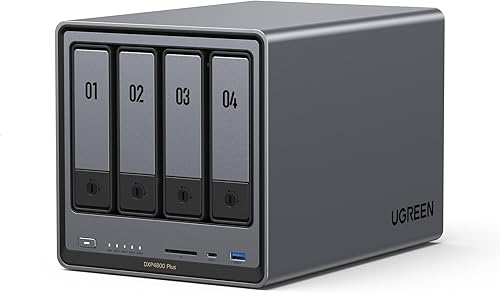
Synology DS923+ 4-Bay NAS
Synology
- ✓4-bay (diskless)
- ✓AMD Ryzen R1600 dual-core
- ✓4GB DDR4 RAM (expandable to 32GB)
- ✓2x M.2 NVMe cache slots
- ✓10GbE ready (expansion slot)
Pros
- AMD Ryzen processor handles hardware transcoding for 4K video
- 4 bays support RAID 5 — 3 drives of usable capacity with 1 drive redundancy
- M.2 NVMe cache slots accelerate random read/write for frequently accessed files
- 10GbE expansion slot for high-bandwidth network connections
- Expandable RAM to 32GB for running Docker containers and virtual machines
Cons
- At $600 diskless, total cost with 4x 4TB drives reaches approximately $1,000
- AMD Ryzen processor runs warmer than previous Intel generations — needs ventilation
Best home server NAS. AMD Ryzen for 4K transcoding, 4 bays for RAID 5, M.2 cache, and 10GbE support — the DS923+ covers every home server use case from Plex to Docker.

Western Digital My Cloud Home
Western Digital
- ✓4TB included (single drive)
- ✓Plug-and-play setup
- ✓Mobile app access
- ✓USB 3.0 expansion port
Pros
- Comes with drive installed — no separate drive purchase needed
- Mobile app for remote access without VPN configuration
- Plug-and-play — operational in under 5 minutes
- Best for users who want cloud-like simplicity with local storage
Cons
- Single drive — no redundancy. Drive failure means data loss
- WD's cloud dependency — some features require WD cloud services
- App ecosystem is minimal compared to Synology DSM
- Not suitable for advanced use cases (Docker, VMs, Plex server)
Best plug-and-play NAS for simple backup use. For users who want a personal cloud drive without configuration: the WD My Cloud Home delivers simplicity that Synology cannot match for non-technical users.

QNAP TS-233 2-Bay NAS
QNAP
- ✓2-bay (diskless)
- ✓Cortex-A55 quad-core processor
- ✓2GB DDR4 RAM
- ✓2x USB 3.2 Gen 1
- ✓QTS operating system
Pros
- Quad-core processor and 2GB RAM at $220 — more capable than Synology DS223j at similar price
- QNAP App Center has strong virtualization and container apps
- USB 3.2 Gen 1 ports for direct drive connection or backup targets
Cons
- QNAP QTS interface is less polished than Synology DSM
- QNAP has had documented security vulnerabilities that were slower to patch than Synology
Best QNAP NAS for hardware value. More processor and RAM than the equivalent Synology DS223j at similar price. Better for users who want raw processing power over software polish.
Your photo library keeps growing, your cloud storage bill keeps climbing, and one hard drive failure could still wipe out everything. An external drive doesn't fix any of that.
A NAS device does. It's a small always-on server that every device on your network can reach, with redundancy built in so a single failed drive doesn't cost you your files.
Which one is actually worth setting up at home?
The Synology DS223j is our top pick. Its DSM software is the cleanest NAS operating system available, and at $250 for two bays, it handles photos, backups, and media serving without the steep learning curve of competitors.
Why a NAS Instead of External Hard Drive
An external hard drive stores files locally on a single drive connected to one computer. Other devices on the network cannot access it without routing through the connected computer.
A NAS is an independent server with its own processor, RAM, and operating system. It connects to your router — all devices on the network can access stored files simultaneously without another computer being powered on.
NAS advantages: always accessible, supports multiple users simultaneously, runs apps (media server, photo manager, backup client) independently, supports RAID for drive redundancy.
NAS disadvantages: more complex setup, higher upfront cost, always-on power consumption (typically 15-25W).
Diskless vs Drives Included
Most NAS units are sold without hard drives — you purchase drives separately to fit your storage requirement.
Diskless advantage: choose your own drives, match capacity to your needs, use drives optimized for NAS workloads (WD Red Plus, Seagate IronWolf).
Drives included (WD My Cloud): simpler purchase, no compatibility research required. Less flexibility in capacity and drive type.
NAS-rated drives vs desktop drives: NAS drives (WD Red Plus, Seagate IronWolf) are rated for 24/7 operation and multi-drive vibration environments. Desktop drives (WD Blue, Seagate Barracuda) are rated for intermittent use. For a NAS that runs continuously: NAS-rated drives are the appropriate choice.
RAID: What It Is and When You Need It
RAID (Redundant Array of Independent Disks) uses multiple drives to provide redundancy against drive failure.
RAID 1 (2 drives): mirrors all data on both drives simultaneously. If one drive fails: no data loss, swap the drive. Total storage = 1 drive capacity. Requires 2 bays.
RAID 5 (3+ drives): distributes data and parity across drives. If one drive fails: no data loss, rebuild from parity. Total storage = (n-1) drives of capacity. Requires 3+ bays.
No RAID (single drive): full capacity, no redundancy. Drive failure means data loss.
For photos, documents, and any data that cannot be replaced: RAID 1 or 5 is appropriate. The DS223j with 2 drives in RAID 1 is the entry-level redundant NAS.
NAS as a Media Server
Synology's media server (Synology Photos, Video Station, Audio Station) and Plex Media Server run on NAS hardware and serve media to TVs, tablets, and phones.
For Plex transcoding (converting video formats on-the-fly for devices that cannot play the original format): the NAS processor must be capable. The DS923+ (AMD Ryzen) handles 4K transcoding. The DS223j (Realtek ARM processor) does not have sufficient processing for hardware-transcoded 4K.
For direct play (device plays the original file without conversion): any NAS with gigabit Ethernet is sufficient — the bottleneck is network speed, not processor.
Most media is direct-play compatible on modern smart TVs and streaming devices. If your media is in common formats (H.264 MKV, MP4): transcoding capability is less critical.
Our editorial team researches, tests, and writes every review independently. We never accept payment for placement.