Best Keycap Sets 2026: PBT, ABS, and Premium Custom Keycaps Compared
Last updated: 2026-08-19 · By NicheHive Editorial
This article contains affiliate links. If you purchase through these links, we may earn a commission at no extra cost to you. As an Amazon Associate, NicheHive earns from qualifying purchases. See our full disclosure.
We tested keycap sets for PBT vs ABS material durability, legend durability (shine and fading), sound profile impact, and compatibility with common keyboard layouts. Budget and premium options compared.
Our Top Picks

Akko ASA profile Keycap Set
Akko
- ✓PBT doubleshot legends
- ✓ASA profile
- ✓Compatible with TKL and full-size
- ✓Mac and Windows modifiers included
- ✓158 keys
Pros
- PBT doubleshot legends do not fade or shine — legends are a separate piece of plastic
- 158-key count covers TKL, full-size, and most Mac layouts
- ASA profile is taller than OEM — some users prefer the more sculpted feel
- Mac and Windows modifiers included in one set
Cons
- ASA profile is non-standard — not compatible with all keyboard cases for fit
- Some colorways have minor texture variation between batches
Best overall keycap set for value. PBT doubleshot legends at $40 with 158 keys covering both Mac and Windows layouts is genuinely hard to beat at this price point.
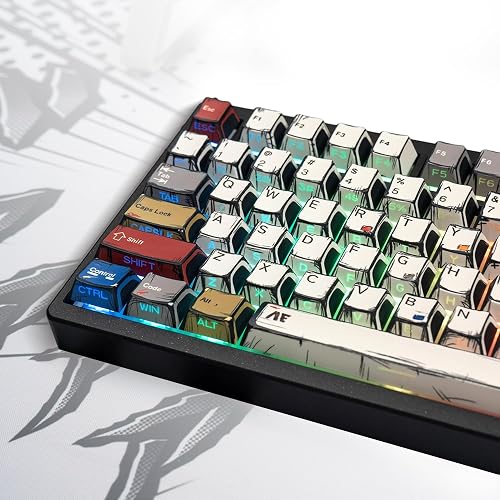
Glorious GPBT Keycap Set
Glorious
- ✓PBT doubleshot
- ✓OEM profile
- ✓114 keys
- ✓Available in multiple colorways
Pros
- OEM profile — compatible with the widest range of keyboard cases and aftermarket stabilizers
- PBT doubleshot legends — fade and shine resistant after 18 months of daily use
- Glorious colorways are considered among the better-looking budget options
- Textured surface is consistent across the set
Cons
- 114-key count does not include all Mac modifiers — additional compatibility research needed
- OEM profile is not as distinctive as more sculpted profiles
Best PBT value keycap set. OEM profile for maximum compatibility, PBT doubleshot for durability, and Glorious aesthetic quality at $50.

Drop + Matt3o MT3 /dev/tty Keycap Set
Drop
- ✓MT3 profile (deep sculpted)
- ✓PBT doubleshot
- ✓Based on vintage VT100 terminal aesthetic
- ✓Novelty keycaps included
Pros
- MT3 profile has the deepest sculpt available — most ergonomic typing angle
- PBT doubleshot from high-quality manufacturer — surface texture is the best in the price range
- Vintage terminal aesthetic is distinctive and remains popular
- Drop's QC on this set is better than most budget group buys
Cons
- At $110, premium price
- MT3 profile is polarizing — some users find it too tall, affecting technique
Best premium keycap set. MT3 profile's deep sculpt improves typing ergonomics for users who type without looking at their hands. The /dev/tty colorway is iconic in the mechanical keyboard community.
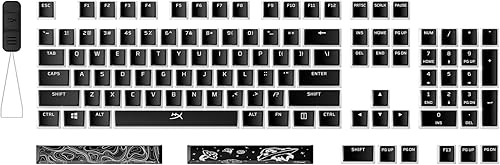
HyperX Pudding Keycap Set
HyperX
- ✓Translucent sides for RGB glow
- ✓OEM profile
- ✓PBT
- ✓Full 104-key set
Pros
- Translucent lower body allows maximum RGB light to show through the sides
- At $20, least expensive way to get pudding-style RGB diffusion
- PBT material despite the low price
- Full 104-key set
Cons
- Legend printing quality is adequate but below doubleshot — may fade after 2+ years
- Translucent bottom means the keycap looks unfinished when removed from the keyboard
Best keycap set for RGB keyboards. Translucent lower body maximizes RGB diffusion for gaming setups where RGB visibility is a priority. PBT material at $20 is exceptional value.
Swap the keycaps on a mechanical keyboard and it doesn't just look different, it sounds different and types different too.
That's a lot of leverage for one upgrade, which is exactly why the best keycap sets are worth choosing carefully.
The real decision points are material, legend durability, and profile shape, not just which colorway catches your eye first.
The Akko ASA profile Keycap Set is our overall pick at $40, with PBT doubleshot legends that won't fade and 158 keys covering both Mac and Windows layouts. If you want the deepest sculpt available, the Drop + Matt3o MT3 /dev/tty set delivers it, at a much higher price.
PBT vs ABS: The Most Important Material Decision
ABS (Acrylonitrile Butadiene Styrene): the material used in most stock keycaps. Smooth finish, slightly shiny out of the box. Develops a glossy sheen in the areas of highest use (home row, frequently used modifiers) after approximately 6-12 months of daily use. The sheen is called "shine" and is considered undesirable by most enthusiasts. Cheaper to manufacture.
PBT (Polybutylene Terephthalate): harder and more durable than ABS. Slightly textured finish that resists the shine development. PBT keycaps feel different from ABS — the texture provides more grip and a slightly different tactile feedback from the keycap surface itself. PBT is the enthusiast standard for daily-use keycaps.
For any keyboard used more than 4 hours per day: buy PBT keycaps. ABS will show shine within 6 months. PBT will remain in its original state for years.
Legend Printing Methods
Laser etched: legend burned into the keycap surface. Cheapest method. Legends fade with use.
Dye sublimation: legend printed using heat to transfer dye into the keycap material. Only works on light-colored keycaps (the dye can only go darker than the keycap base color). Very durable — legend is part of the material, cannot be rubbed off.
Doubleshot: the legend is a second piece of plastic injected inside the keycap — it is physically part of the keycap, not printed on it. Most durable legend method. Works with any color combination. Slightly more expensive than dye sub. Both ABS and PBT doubleshot are available.
For maximum longevity: PBT doubleshot is the best combination.
Keycap Profiles
The profile is the shape and height of the keycap. Different profiles have different typing feels:
OEM profile: standard profile used by most gaming keyboard manufacturers. Moderate height, moderate sculpt. Compatible with most aftermarket stabilizers.
Cherry profile: shorter than OEM, used by Cherry MX keyboards and many custom builds. The most popular enthusiast profile.
SA profile: tall with spherical top. The most sculpted profile. Best for touch typists. Polarizing — some users find it too tall.
MT3 profile: designed by Matt3o, similar height to SA with improved ergonomic angles. Drop's house profile.
XDA/DSA profiles: flat profile with uniform height across all rows. Popular for 60% and ergo keyboards where row-specific sculpting is less relevant.
For beginners: start with OEM profile (familiar from most gaming keyboards). Upgrade to Cherry or MT3 once you have a preference for shorter or taller profiles.
Compatibility: Layout and Mount
Before buying keycaps, confirm:
- Switch stem type: Cherry MX-compatible stem (+ shaped) is standard. Topre and Alps switches require specific keycaps.
- Bottom row layout: the spacebar and modifier row varies by keyboard. Standard full-size, TKL, and most gaming keyboards use the same bottom row. HHKB, 60%, and some custom boards use non-standard layouts requiring additional keys.
- Key count: TKL needs approximately 87 keys, full-size needs 104. Most keycap sets include extras for compatibility.
Check the keyboard's layout documentation before purchasing a keycap set.
Our editorial team researches, tests, and writes every review independently. We never accept payment for placement.