Best Cable Management Solutions 2026: Tested for Clean Desk Setups
Last updated: 2026-08-19 · By NicheHive Editorial
This article contains affiliate links. If you purchase through these links, we may earn a commission at no extra cost to you. As an Amazon Associate, NicheHive earns from qualifying purchases. See our full disclosure.
We tested cable management products for ease of installation, durability, and how well they actually hide cables. Cable boxes, raceways, velcro ties, and under-desk trays compared for different setup types.
Our Top Picks

JOTO Cable Management Sleeve
JOTO
- ✓Flexible neoprene sleeve
- ✓Zipper closure
- ✓19-inch length, expandable to 1.3-inch diameter
- ✓Pack of 4
Pros
- Neoprene sleeve bundles 3-5 cables into one tidy run
- Zipper makes adding or removing cables straightforward
- 4-pack covers monitor cable run, PC tower run, desk edge run, and spare
- At $10 for 4, least expensive effective cable bundling
Cons
- Neoprene is not rigid — does not hold a specific cable routing path
- Does not work well for cables that run in multiple directions
Best overall cable management solution. Flexible neoprene sleeves bundle multiple cables into clean single runs at minimal cost. Best for runs that go in one direction — monitor, PC, desk edge.
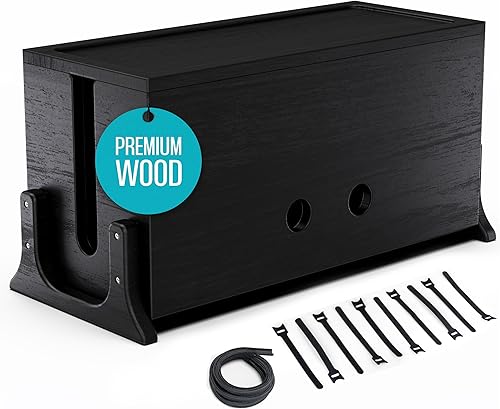
Bluelounge CableBox
Bluelounge
- ✓Fits power strips up to 14 inches
- ✓Two cable exit points
- ✓ABS plastic
- ✓Available in white and black
Pros
- Power strip hidden inside — eliminates the most cluttered element of most desks
- Two exit points route power cables in two directions
- Clean rectangular form factor sits neatly under a desk
- Fits most 6-outlet and 8-outlet power strips
Cons
- At $40, relatively expensive for a plastic box
- Power strip must be removed to access plugs after installation
Best cable management box for power strips. Hiding the power strip eliminates the most visually chaotic element of most desk setups. Two cable exits handle both monitor and PC side routing.

Greenify Co Under Desk Cable Tray
Greenify Co
- ✓Metal mesh tray
- ✓Screws under desk
- ✓16-inch x 4-inch tray
- ✓Powder coated black or white
Pros
- Metal mesh tray holds power strip, cables, and adapters completely under the desk
- Screw mount is secure — no adhesive failure risk
- All cable clutter disappears from view entirely
Cons
- Requires drilling or screwing into the desk underside
- Not suitable for glass or thin desks where screwing is not possible
Best under-desk cable tray. Metal mesh tray holds the power strip and all associated cables completely under the desk, making the desk surface and surroundings visually clean.

VELCRO Brand One-Wrap Cable Ties
VELCRO Brand
- ✓Reusable velcro ties
- ✓25-pack, assorted lengths
- ✓Hook-and-loop closure
- ✓Cut to length
Pros
- Reusable — rearranging cables does not require cutting ties like zip ties
- No sharp edges after wrapping — safe for cable insulation
- Assorted lengths fit both thin USB cables and thick power cables
- At $13 for 25, inexpensive enough to use generously
Cons
- Hook-and-loop material catches on fabric — headphone cable velcro fibers can attach
- Not as permanent as zip ties — may loosen over time in high-traffic areas
Best cable ties for desk setups. Velcro cable ties are the universal tool for cable management — reusable, no sharp edges, and work at every point in a cable management system.
Take a photo of your desk right now. Chances are there's a nest of cords behind the monitor that makes the whole setup look unfinished, no matter how nice the desk itself is.
Good cable management isn't one product. It's a small system: something to bundle cables, something to hide the power strip, and something to route the run to the wall.
Do you actually need to buy four different things to fix this?
Not really. The JOTO Cable Management Sleeve is our top pick because a single $10 four-pack of neoprene sleeves bundles the monitor run, PC run, and desk-edge run into three clean lines, which solves most of the mess by itself.
A Simple System for Desk Cable Management
Step 1 — Hide the power strip: put it in a cable box (Bluelounge CableBox) or under-desk tray (Greenify Co). The power strip is typically the largest cable bundle on the desk, and hiding it eliminates 60% of visible cable clutter.
Step 2 — Bundle cable runs: group monitor cables, PC cables, and peripheral cables separately using cable sleeves (JOTO) or velcro ties. Bundle each run into a single object.
Step 3 — Route bundles under the desk: use cable clips, adhesive cable channels, or raceways to run bundles under the desk surface from their origin to the power strip.
Step 4 — Floor run: if the power strip needs a long run to reach the wall outlet, use a cable raceway (paintable plastic channel) to run the cord along the baseboard.
After the four steps, the desk surface has only the cables reaching the equipment that needs to be there. All other cable runs are hidden.
Choosing the Right Product for Each Step
Power strip hiding: cable box ($20-$40) for desktop placement, metal mesh tray ($20-$30) for under-desk mounting. Choose based on whether you want the power strip accessible (box, sitting on desk area) or completely hidden (tray, screwed under desk).
Bundling: cable sleeves for cable runs going in one direction. Velcro ties for shorter groupings or for bundling cables before they enter a sleeve.
Routing: adhesive cable clips (small, cheap, widely available) route individual cables along the desk underside or legs. Raceways (paintable channels) work better for floor runs.
Adhesive vs Screw Mount
Adhesive cable management products (cable clips, raceways) are convenient but fail over time — especially in warm rooms or if the adhesive contacts an oily surface.
Before applying adhesive: clean the surface with isopropyl alcohol and allow to dry. Apply firm pressure for 60 seconds after sticking. Wait 24 hours before loading the clip with cables.
For permanent installations (standing desks, workstations that will not move): screw-mount cable trays are more reliable long-term. Screwing requires drilling or self-tapping screws into the desk underside.
Standing Desks and Cable Management
Standing desks complicate cable management because the desk height changes — cables must have enough slack to accommodate the full range of motion from sitting to standing height (typically 300-400mm of height change).
For standing desks:
- Use a cable spine or extendable cable carrier to accommodate the movement
- Do not use rigid raceways for the section that moves with the desk — only for below the desk
- Allow extra cable length for monitor cables — a cable that reaches at sitting height may be too short at standing height
Our editorial team researches, tests, and writes every review independently. We never accept payment for placement.